






Condition: Match snapshot
ConditionNo. 9139
Synopsis
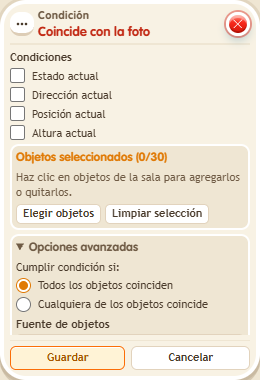
Saving the box takes a snapshot of the selected objects; tick what to compare, for example “Current position”. To update the snapshot you must save the box again. Use it for puzzles where everything has to be in its place.
Step by step
Check a saved position
Boxes you need
 TriggerTrigger: Say something
- ConditionCondition: Match snapshot
 EffectEffect: Show message
- Stack “Says something” 9111, this condition and “Show message” 9185. Set the trigger to “hello”, exact match; set the effect to “Matched”, targeting the triggering user.
- Select an object. Check only “Current position” and save the condition to take its snapshot. Save the other boxes.
- Say “hello”, move the object to another tile with the editor without resaving the condition, then say “hello” again.
Result: The message appears before moving it and stops after moving it.
Settings
Notes
- Resaving the condition updates its snapshot; do not do so between the two checks.
- The snapshot for Condition: Match snapshot is taken when you save the box. To update it, save again.