






Effect: Move and rotate object
EffectNo. 9183
Synopsis
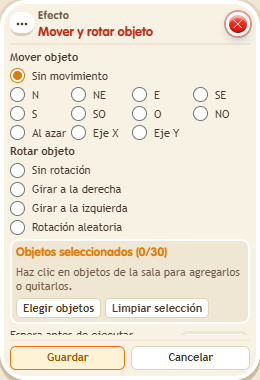
Each time it runs, the selected objects take one step in the chosen direction and can change orientation (BoomBang objects only have two orientations). Directions follow the map unless you enable “Screen directions”; you can also stop it from bumping into other objects or stacking, or make it jump to a random free tile. Use it for board pieces, sliding doors or moving scenery.
Step by step
Move a piece one tile
Boxes you need
 TriggerTrigger: Say something
- EffectEffect: Move and rotate object
- Place a movable object at the beginning of a row of three clear tiles. On another tile, stack “Says something” and this effect.
- Set the trigger text to “move” and save. In the effect select only that object, direction E and “No rotation”.
- Leave screen directions and random movement unchecked; use delay 0. Save.
- Say “move”, wait one second and repeat. Check the position after each use.
Result: The object advances one map tile east per activation without changing its orientation.
Settings
Notes
- Directions follow the map while screen directions are disabled. Keep the route clear.
- When moving or rotating, “screen” uses screen directions: up is up on the screen.
- “Don't collide” doesn't let the object go where there's already another object.
- “Don't stack” doesn't let a walkable object land on another walkable object.
- “Random” makes the object jump to any free tile in the zone.
- BoomBang objects only have two orientations, and only if they can be flipped.