






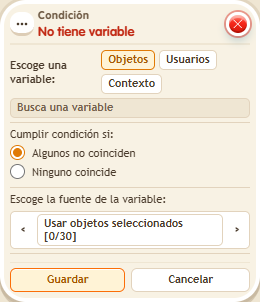
Condition: Does not have variable
ConditionNo. 9148
Synopsis
The opposite of  Condition: Has variable. Remember that a variable with value 0 still counts as owned; use
  Effect: Remove variable to remove it. Useful to give something only once, or to block players who have not earned the key yet.
Step by step
Check that you do not have a key yet
Boxes you need
 TriggerTrigger: Say something
 TriggerTrigger: Step on an object
- ConditionCondition: Does not have variable
 EffectEffect: Show message
 EffectEffect: Give variable
- Stack “Says something” 9111, this condition and “Show message” 9185. Set the trigger to “hello”, exact match; set the effect to “Matched”, targeting the triggering user.
- Save a user variable
 9291 named “key”, with “Has a value” and “While the user is in the room”. In another stack, “Walks on object” 9117 selects a rug and “Give variable” 9237 gives “key” to the triggering user, initial 0, without overwriting.
 - In this condition choose Users, select “key” and use the triggering user. Leave the first matching option selected and save everything.
- Say “hello”, step onto the rug and say “hello” again.
Result: The message appears before receiving the key, then stops.
Settings
Notes
- A variable with value 0 still exists. “Remove variable” deletes it.