






Condition: Performing an action
ConditionNo. 9175
Synopsis
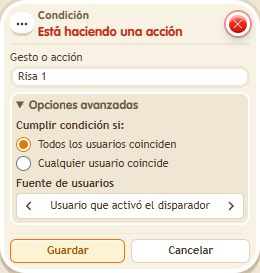
Choose the BoomBang gesture, such as “Laugh 1”, and who is checked. A gesture counts for about 2 seconds after it is made, so the check must come right away. Useful for gesture passwords or copycat games.
Step by step
Check a recent laugh
Boxes you need
 TriggerTrigger: Say something
- ConditionCondition: Performing an action
 EffectEffect: Show message
- Stack “Says something” 9111, this condition and “Show message” 9185. Set the trigger to “hello”, exact match; set the effect to “Matched”, targeting the triggering user.
- Choose “Laugh 1” in the condition and use the triggering user. Save.
- Without making a gesture, say “hello”. Then perform Laugh 1 and immediately say “hello” again. Wait 3 seconds and repeat one last time.
Result: The message appears on the check immediately after Laugh 1.
Settings
Notes
- The gesture remains active for about 2 seconds. Prepare “hello” so you can send it immediately after laughing.
- Condition: Performing an action is true for 2 seconds after the gesture.
- Gestures in
 Trigger: Perform an action, Condition: Performing an action and
  Selector: Users by action: 101 laugh 1, 102 laugh 2, 103 fart, 104 spit, 105 heart, 106 special, 107 cry, 108 redbull, 109-118 sound words.
 - The laugh still counts as “laugh” and the heart as “blow a kiss”. Gestures count for 2 seconds.