






Trigger: Press a key
TriggerNo. 9123
Synopsis
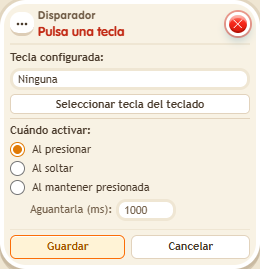
Click “Select key from keyboard”, press the key and choose when it counts, for example “On press”. It only works with focus outside the chat, and some keys are reserved for the browser and the chat. Ideal for game controls, abilities or shortcuts on your island.
Step by step
A key for teleporting
Boxes you need
- TriggerTrigger: Press a key
 EffectEffect: Teleport to object
- Place a rug. Stack this box and “Teleport to object” 9186, selecting the rug and the triggering user.
- Press “Select key from keyboard”, press E and choose “On press”. Save both boxes.
- Close the windows, move focus away from chat and press E.
Result: E takes you to the rug; another key does not trigger this stack.
Settings
Notes
- The client reserves some keys for the browser and chat; use one accepted by the picker.
- Trigger: Press a key cannot reserve Escape, Enter, Tab or the F1 to F12 keys: they still belong to the player (closing windows, opening the chat, the browser).
- While you type in the chat or any text field, Trigger: Press a key receives nothing: your keys go to the text.