






Effect: Start transaction
EffectNo. 9217
Synopsis
It uses the contracts ( Payment contract,
  Trade contract,
  Reward contract or
  Addon: Contract) and the chests you choose. If there is a payment, the keko offers sacks, ingots or objects from their bag in the “Circuit Trade”; wallet gold and silver do not count, and paying requires trade mode to be on. It is all or nothing: if something fails, the whole thing is undone. Use it for shops, paid entries or swaps.
Step by step
Exchange 1,000 gold for 2,000 silver
Boxes you need
 TriggerTrigger: Say something
- EffectEffect: Start transaction


- Once you can configure your chests, place a gold chest and a silver chest, enable Circuit transactions and unlock them. Deposit Silver Ingots in the silver chest and confirm: it should show 50,000.
- Place a trade contract. In Payment option 1 add 1,000 gold. Under You will receive add 2,000 silver. Save each element and the contract.
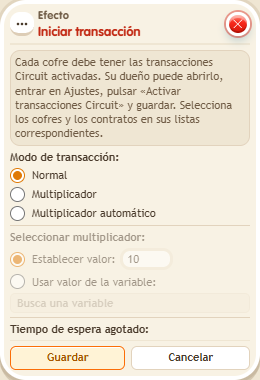
- Stack “Says something” (“exchange”) and “Start transaction”. Use Normal mode, the triggering user and delay 0.
- Select both chests under Chests. Under Contracts choose secondary object selection, activate its button and select the contract. Save.
- The participant carries a Gold Sack in their backpack. After saying “exchange”, they offer that sack, accept, wait for the countdown and confirm.
Result: The gold chest receives 1,000, the silver chest is left with 48,000 and the participant receives 2,000 silver in their wallet.
Settings
Notes
- Only the chest owner can change its settings and withdraw manually. Owning the island does not make you the owner of other people’s chests. Request gold as currency; payment uses a backpack sack, not wallet gold.
- To use a chest in circuits, turn on “circuit” in its settings and remove the lock: it's locked when placed.
- A regular chest can't be chosen in
 Effect: Give coins from chest,
  Effect: Give object from chest or Effect: Start transaction: the box warns you and doesn't save.
 - If a transaction fails halfway (for example, the chest ran out of space), it's fully undone: the player keeps what they offered, gets nothing, the chests stay the same and
 Trigger: Transaction failed fires.
Related
Used in these recipes