






Effect: Give variable
EffectNo. 9237
Synopsis
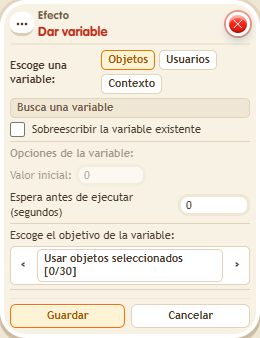
The variable box defines the value; this effect gives it to each chosen user or object (or to the run's context). You choose the starting value and whether to overwrite an existing variable; without overwriting, giving it again does not change its value. It is always needed before  Effect: Change variable value, which does not create the variable.
Step by step
Give a variable with value 7


- Configure a “User variable” named “keys”: enable “Has a value” and “While the user is in the room”. Save the variable first.
- Stack “Says something” (“key”) and “Give variable”. Press Users, find “keys” and choose the triggering user.
- Enter 7 as the initial value and leave overwrite existing variable unchecked. Save with delay 0.
- Say “key”. In /circuits → Variables select “keys” and inspect your value. Repeat the word.
Result: You have the variable with value 7. Giving it again without overwrite neither resets nor adds to it.
Settings
Notes
- Configuring the box defines the variable; this effect gives it to each user. It is cleared on leaving because of the chosen duration.
- Effect: Change variable value doesn't create the variable: you need Effect: Give variable first.
- Inside a stack the order is fixed: give → change → remove →
$(…)is read → messages → signal. It doesn't depend on height.
Related
Used in these recipes