






Addon: Level system
AddonNo. 9272
Synopsis
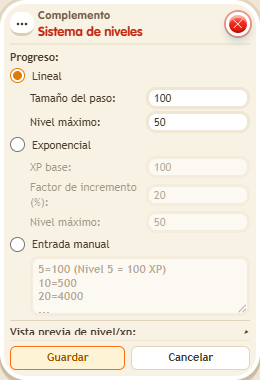
It goes on the same tile as the box that defines the variable, which must hold a value. You choose the progression (for example, “Linear”), the step and the max level, and enable sub-variables such as “Current level” or “Level progress %” to use in texts or conditions. Great for experience systems in your game; display it with  Addon: Level progress.
Step by step
Calculate a level from experience
Boxes you need
 TriggerTrigger: Say something
- AddonAddon: Level system
 AddonAddon: Variable value in text
 EffectEffect: Give variable
 EffectEffect: Show message

- Configure a “User variable” named “xp”, with a value. Add “Level system” on the same tile.
- Choose “Linear”, step size 100 and maximum level 10. Enable the “Current level” and “Level progress %” subvariables; save.
- In another stack, use “Says something” = “level”, “Give variable xp” with initial value 250, triggering user and no overwrite, “Variable text” and “Show message”.
- In “Variable text”, use Users → triggering user, select “xp.current_level”, numeric individual output and identifier “level”. Set the message to “Level $(level)”, for the triggering user only. Save and say “level” with a user who has no previous xp.
Result: With 250 xp you read “Level 3”. Progress within that level is 50%.
Settings
Notes
- Putting the system in the message stack is not enough: it must share a tile with the xp definition box.
- In Addon: Level system the variable must have a value.
xp_requiredis the cost of the current tier andis_maxedonly exists once the maximum is reached.