






Condition: Object type matches
ConditionNo. 9141
Synopsis
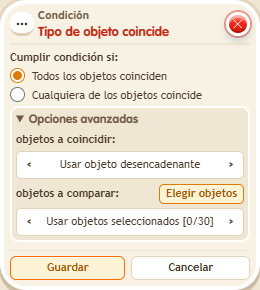
Compares specific objects, not models: two identical mats from the catalogue are different objects. The usual setup is “Triggering object” compared with your selection. Useful when one trigger watches several objects and only some should continue.
Step by step
Accept one specific rug
Boxes you need
 TriggerTrigger: Step on an object
- ConditionCondition: Object type matches
 EffectEffect: Show message
- Place rugs A and B. Stack “Walks on object” 9117, this condition and “Show message” 9185, text “Matched”, to the triggering user. Select A and B in the trigger.
- In the condition, use the triggering object for objects to match. For objects to compare, use selected objects and select only A. Save everything.
- Step onto A, step off and step onto B.
Result: Only A shows “Matched”.
Settings
Notes
- It compares specific objects, even if both rugs are from the same catalogue entry.
- Condition: Object type matches compares specific objects: two identical dice are different objects.