






Trigger: Transaction completed
TriggerSpecial requirementsNo. 9131
Synopsis
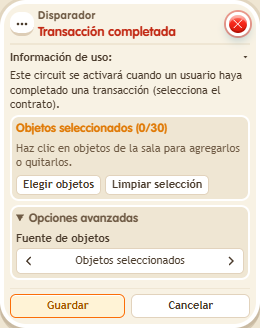
Select the contract and the stack runs when the transaction started with  Effect: Start transaction completes: the player paid, accepted and confirmed. It needs chests set up for circuits and with enough funds. Use it to say thanks, open a path or hand out a bonus after a sale.
Step by step
Confirm a completed trade
Boxes you need
- TriggerTrigger: Transaction completed
 TriggerTrigger: Say something
- EffectEffect: Start transaction
 EffectEffect: Show message
- Prepare three chests you own (
 Object chest objects,
  Gold chest gold,
  Silver chest silver), with Circuit transactions enabled and unlocked. Deposit Silver Ingots in the silver chest. In a trade contract
  9304, request 1,000 gold and 1 ordinary object; offer 2,000 silver. Save each element and the contract.
 - Stack A: “Says something” 9111 = “trade” and “Start transaction” 9217, Normal mode. Select the three chests under Chests and the contract in the secondary Contracts selection; target the triggering user.
- Stack B: this box selecting that contract, plus “Show message” 9185, “Completed”, to the triggering user. Save everything. Participate with a Gold Sack and the requested object: say “trade”, offer both, accept and confirm after the countdown.
Result: The trade delivers the silver and then shows “Completed”.
Settings
Notes
- Requires configurable chests and sufficient funds. Accepting without confirming does not complete the transaction.
- A transaction completes in full or is rolled back in full. If it fails, you keep what you offered, receive no reward and the chests remain unchanged.
Related
- Trade contract
- Object chest
- Gold chest
- Silver chest
- Trigger: Say something
- Effect: Start transaction
- Effect: Show message
Used in these recipes