






Effect: Restore snapshot
EffectNo. 9194
Synopsis
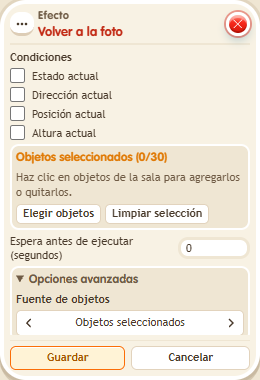
Saving the box takes a “snapshot” of the selected objects; when it runs, they go back to it. You can tick what to restore: state, direction, position and height. To change the return point, save the box again. Ideal for resetting a board or game zone at the end of each round.
Step by step
Return an object to its saved position
Boxes you need
 TriggerTrigger: Say something
- EffectEffect: Restore snapshot
- Place a movable object at A. Stack “Says something” and “Match snapshot”. Set “return”.
- Select the object in the effect and check only Position; uncheck state, direction and height. Save while the object is still at A.
- Move the object to B with the editor without saving the effect again.
- Say “return”.
Result: The object returns to position A saved in the snapshot.
Settings
Notes
- The snapshot updates when you save the box. Save again only when you want a new return point.
- Boxes that compare or restore a snapshot capture it when you save. Save again after arranging the objects if you want to update it.