






Effect: Join team
EffectNo. 9202
Synopsis
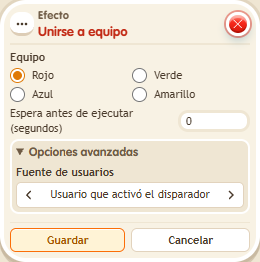
Choose the team colour, the game type (use Circuits) and who to target. Teams are the basis for points, scoreboards and team conditions such as  Condition: Team member. Use it at a game's entrance to split players up.
Step by step
Join the red team
Boxes you need
 TriggerTrigger: Say something
- ConditionCondition: Team member
- EffectEffect: Join team
 EffectEffect: Show message
- Stack “Says something” (“red”) and “Join team”. Choose the red team, Circuits type and triggering user. Save.
- On another tile stack “Says something” (“check”), “User belongs to team” and “Show message”.
- Set the condition to red and the triggering user. Enter “You are on the red team” in the message, visible only to the triggering user. Save.
- Say “red”, then “check”.
Result: The check displays the message because your keko belongs to the red team.
Settings
Notes
- Use the Circuits team type for this recipe; you do not need another game mode.
- Joining a team or teleporting doesn't give the keko any visible effect.