






Condition: Selection count
ConditionNo. 9179
Synopsis
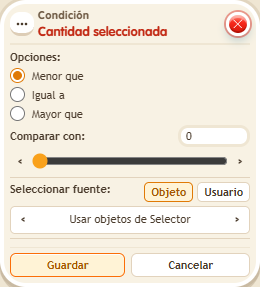
Choose the source (users or objects from the selector), the comparison and the amount. It counts what the stack’s selectors picked, such as  Selector: Users in area, even if the triggering keko is outside. Ideal to start a game once enough players are in the starting area.
Step by step
Require two users inside an area
Boxes you need
 TriggerTrigger: Say something
- SelectorSelector: Users in area
- ConditionCondition: Selection count
 EffectEffect: Show message
- Stack “Says something” 9111, this condition and “Show message” 9185. Set the trigger to “hello”, exact match; set the effect to “Matched”, targeting the triggering user.
- Add “Users in area” 9251 to the stack. Mark a small clear rectangle in the room and leave random selection disabled.
- In the condition choose “Greater than”, count 1, Users source, and “Use users from Selector”. Save everything.
- Place only one person inside the area and say “hello”. Have a second person enter and say it again.
Result: The message appears when at least two users are selected inside the area.
Settings
Notes
- The message still targets whoever says “hello”; the condition counts users in the area even if the speaker is outside it.
- With an empty selection, “all match” passes and “any match” fails. If you need at least one user or object, also check the selected quantity.