






Effect: Modify scoreboard
EffectNo. 9196
Synopsis
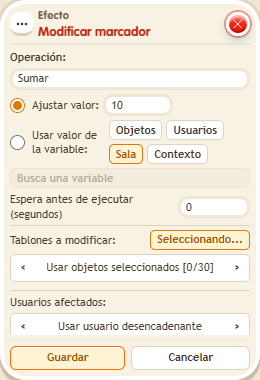
It writes straight into each user's row on the selected scoreboards, without needing a game. “Set” replaces the value, while “Add” and “Subtract” change it. Pick the scoreboards with object selection and the users with a source (for example, the triggering user). Useful for personal records or tables you manage yourself.
Step by step
Write 10 points to a scoreboard
Boxes you need
 TriggerTrigger: Say something
- EffectEffect: Modify scoreboard

- Place a permanent “Stack each game” scoreboard. On another tile stack “Says something” (“score”) and “Modify scoreboard”.
- Choose Set, fixed value 10 and delay 0.
- For scoreboards choose selected objects, activate that selection and click only the scoreboard. Choose the triggering user. Save.
- Say “score” and read your scoreboard row. Repeat the word.
Result: Your entry shows 10 points; repeating the assignment keeps it at 10.
Settings
Notes
- Set replaces the value. Add and Subtract perform different operations; this example does not depend on an active game.