






Addon: Time utilities
AddonNo. 9273
Synopsis
It sits with the box that defines the variable and creates sub-variables for the parts you tick, such as “Second”. Parts counted since 1970 use UTC, while calendar parts use the room's time zone. It is not a stopwatch that runs by itself: it only reads the stored value. Useful for showing race times or dates.
Step by step
Convert milliseconds into seconds
Boxes you need
 TriggerTrigger: Say something
- AddonAddon: Time utilities
 AddonAddon: Variable value in text
 EffectEffect: Give variable
 EffectEffect: Show message

- Configure a “User variable” named “stamp”, with a value. Put “Time utilities” on the same tile.
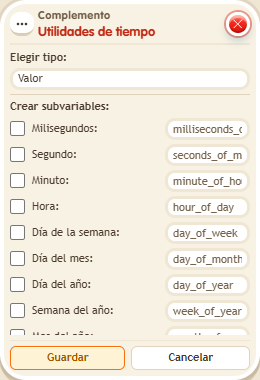
- Choose type “Value” in the extra. Open “Advanced subvariables” and enable “Second”. Save so that “stamp.value.second” appears.
- In another stack, use “Says something” = “time”, “Give variable stamp” (triggering user, initial 1500, no overwrite), “Variable text” and “Show message”.
- For the text, choose Users → triggering user, “stamp.value.second”, numeric individual mode and identifier “seconds”. Set the message to “Seconds: $(seconds)”, for the triggering user only. Save and say “time” with a user who has no previous stamp.
Result: The message shows “Seconds: 1”: 1500 milliseconds contain one whole second.
Settings
Notes
- Advanced subvariables count from 1970 in UTC. Calendar parts use the room’s time zone. They are not a timer that advances on its own.
- In Addon: Time utilities only the parts you tick exist.
- In Addon: Time utilities, the parts counted from 1970 are in UTC and the calendar ones use the zone's time zone.