






Condition: Team member
ConditionNo. 9163
Synopsis
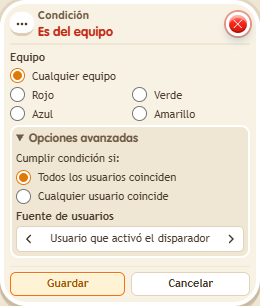
Choose the team colour and who is checked. It looks at the keko’s current team, regardless of points. Use it for team doors, rewards or areas, together with  Effect: Join team.
Step by step
Check the red team
Boxes you need
 TriggerTrigger: Say something
- ConditionCondition: Team member
 EffectEffect: Show message
- EffectEffect: Join team
- Stack “Says something” 9111, this condition and “Show message” 9185. Set the trigger to “hello”, exact match; set the effect to “Matched”, targeting the triggering user.
- Choose the red team in the condition and use the triggering user.
- In another stack, add “Says something” 9111, exact text “red”, and “Join team” 9202. Set the effect to red, game “Circuits”, and the triggering user. Save everything.
- With a user who is not yet on the red team, say “hello”. Then say “red” and repeat “hello”.
Result: The message appears after you join red.
Settings
Notes
- The comparison uses the user’s current team; it does not count points or require ownership.
- In team conditions, a fixed colour is a fact about the zone: it doesn't look at anyone.
- With “triggering user's team”, if the keko has no team the condition is not met.