






Effect: Change bot colors
EffectNo. 9219
Synopsis
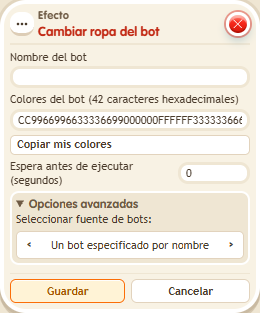
You pick the bot by name and write its seven colours as 42 hexadecimal digits in a row, with no # or separators. The change is saved, as if you made it from the bot's panel. Note down its previous colours if you want to restore them. Useful for bots that change outfits depending on the game.
Step by step
Change a bot's colors
Boxes you need
 TriggerTrigger: Say something
- EffectEffect: Change bot colors
- Place a bot you own and name it “Guide”. Stack “Says something” (“paint”) and “Change bot colors”.
- Enter “Guide” as the bot name. Keep the source set to name.
- Enter “FF000000FF000000FFFFFF00FF00FF00FFFFFFFFFF” as the colors: seven six-digit colors. Save with delay 0.
- Say “paint” and inspect the bot. Open its panel to check that the change was saved.
Result: The bot uses the seven new colors and keeps the change.
Settings
Notes
- The field requires 42 hexadecimal digits with no # or separators. Keep the old colors if you want to restore them.
- Effect: Change bot colors uses BoomBang colours and the change is saved, as if the owner changed it in the bot's panel.