






Condition: Chest has contents
ConditionSpecial requirementsNo. 9181
Synopsis
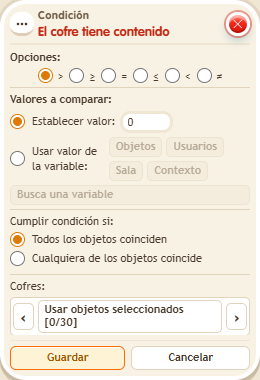
Select the chest, such as the  Gold chest, the comparison and the value. For example, “= 0” tells you a gold chest is empty. You need to be able to view the chest. Use it to warn that a chest needs refilling or to close a shop with no funds.
Step by step
Detect an empty gold chest
Boxes you need
 TriggerTrigger: Say something
- ConditionCondition: Chest has contents
 EffectEffect: Show message
- Stack “Says something” 9111, this condition and “Show message” 9185. Set the trigger to “hello”, exact match; set the effect to “Matched”, targeting the triggering user.
- Place an empty “Gold chest” 9307 that you can inspect. Select it as the chest in the condition and choose comparison =, fixed value 0, and “All objects match”. Save.
- Say “hello” while the chest is empty. If you have deposit permission, deposit a Gold Sack from your backpack and say “hello” again.
Result: The message confirms that the gold amount is zero; it stops once the chest contains gold.
Settings
Notes
- You need permission to inspect the chest and, for the second check, to deposit into it. If its window does not enable those actions, the check is limited to the empty chest.