






Selector: Objects from signal
SelectorNo. 9257
Synopsis
Goes in a  Trigger: Receive signal stack and recovers the objects sent by the sending stack with
  Effect: Send signal. The antenna identifies the link, and the sending stack must include the objects. Useful to reuse one effect stack with different objects.
Step by step
Recover objects from a signal
Boxes you need
 TriggerTrigger: Say something
- TriggerTrigger: Receive signal
- SelectorSelector: Objects from signal
 SelectorSelector: Selected objects
- EffectEffect: Send signal
 EffectEffect: Offset object position

- Place an antenna. In stack A, combine “Says something” = “radio”, “Picked objects” and “Send signal”.
- Pick an object A with free space to its right. In “Send signal”, pick the antenna and send objects from the selector.
- On another tile build stack B with “Receives signal” (pick the same antenna), “Objects from signal” and “Move object by offset”. Save the selector with filter and invert off.
- In the movement effect, use “Objects from selector”, X right 1, Y 0 and delay 0. Save everything and say “radio”.
Result: A moves one tile because it was carried by the signal.
Settings
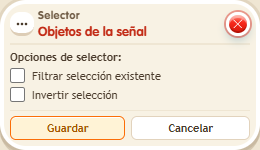
Notes
- The antenna identifies the connection. The sending stack must include the users or objects you want to select.