






Condition: Not a team member
ConditionNo. 9164
Synopsis
The opposite of  Condition: Team member: it lets through anyone not on that team, including players without a team. Useful to guard a team’s base or to invite players who have not picked a colour yet.
Step by step
Allow users outside the red team
Boxes you need
 TriggerTrigger: Say something
- ConditionCondition: Not a team member
 EffectEffect: Show message
 EffectEffect: Join team
- Stack “Says something” 9111, this condition and “Show message” 9185. Set the trigger to “hello”, exact match; set the effect to “Matched”, targeting the triggering user.
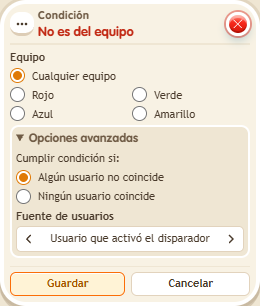
- Choose the red team in the condition and use the triggering user.
- In another stack, add “Says something” 9111, exact text “red”, and “Join team” 9202. Set the effect to red, game “Circuits”, and the triggering user. Save everything.
- With a user who is not yet on the red team, say “hello”. Then say “red” and repeat “hello”.
Result: The message appears before joining red and stops appearing afterward.
Settings
Notes
- The comparison uses the user’s current team; it does not count points or require ownership.
- In team conditions, a fixed colour is a fact about the zone: it doesn't look at anyone.
- With “triggering user's team”, if the keko has no team the condition is not met.