






Condition: Object height
ConditionNo. 9172
Synopsis
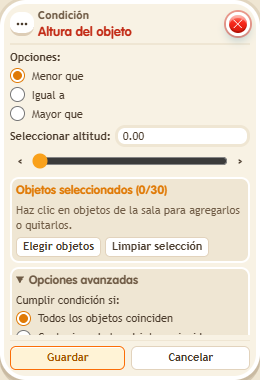
Choose the comparison, the height and whether all objects must match. In BoomBang only BBoxes and circuits boxes have height, compared by level in hundredths. Combine it with  Effect: Change height for lifts, platforms or height puzzles.
Step by step
Require a height above 1.5
Boxes you need
 TriggerTrigger: Say something
- ConditionCondition: Object height
 EffectEffect: Show message
- EffectEffect: Change height
- Stack “Says something” 9111, this condition and “Show message” 9185. Set the trigger to “hello”, exact match; set the effect to “Matched”, targeting the triggering user.
- Place a BBox and select it in the condition. Choose “Greater than”, height 1.5, and require all objects to match.
- In another stack, add “Says something” 9111, exact text “height”, and “Change height” 9213. Select the same BBox, choose to set its height, and enter 1. Save.
- Say “height” and “hello”. Then change the effect’s value to 2, save, and repeat both words.
Result: At height 1 the message does not appear; at height 2 it does.
Settings
Notes
- Use a BBox with no users or objects on top so the height change is easy to observe.
- Only BBoxes and circuit boxes have height. Condition: Object height compares against the level, in hundredths.