






Effect: Write to log
EffectNo. 9228
Synopsis
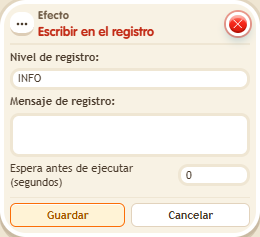
Each activation adds a line with the level (for example, INFO) and the text you choose. The log is viewed in /circuits → Log and requires read permission: it is not a chat message. It works even if the trigger has no person. Ideal for checking that your stacks fire when you expect.
Step by step
Leave an entry in the log
Boxes you need
 TriggerTrigger: Say something
- EffectEffect: Write to log
- Stack “Says something” (“log”) and this effect.
- Select INFO and enter “Test received”. Leave delay at 0 and save every box.
- Say “log”. Open /circuits → Log, refresh and find the text.
- Repeat the word after one second and refresh to see a second entry.
Result: Each activation adds an INFO entry with the chosen text.
Settings
Notes
- The log is read from the circuits menu and requires read permission; it is not a public chat message.
- Effect: Write to log works even when the trigger has nobody who fires it: it doesn't need a selector.