






Effect: Move object to object
EffectNo. 9234
Synopsis
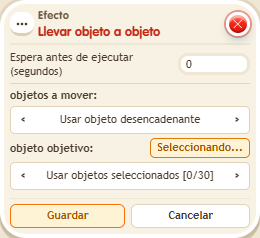
It has two lists: the objects that move and the target objects. In BoomBang things only stack on top of a BBox or circuit boxes, not on any decoration. Useful for putting pieces in place or building structures that change.
Step by step
Place an object on a BBox
Boxes you need
 TriggerTrigger: Say something
- EffectEffect: Move object to object
- Place a movable object A and a BBox B on different tiles. Stack “Says something” (“stack”) and this effect.
- For objects to move choose selected objects, activate its selection and click only A.
- For destinations choose secondary object selection, activate it and click only B. Save with delay 0.
- Say “stack” and observe A's destination.
Result: A moves to B's tile and is stacked on the BBox.
Settings
Notes
- The two lists have different roles. In BoomBang, stacking uses BBoxes or circuit boxes, not arbitrary decorations.
- Effect: Move object to object only stacks on top of a BBox or circuit boxes.