






Effect: Mute user
EffectNo. 9198
Synopsis
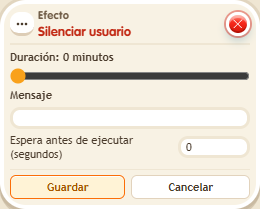
The number is in minutes (0 does not mute) and you can add a message for the keko. It does not affect the owner, users with rights or moderators. A muted keko also cannot trigger circuits by talking, so to lift it use another trigger, such as stepping on an object. Useful for speaking turns or silence games.
Step by step
One minute of silence
Boxes you need
 TriggerTrigger: Say something
- EffectEffect: Mute user
- Stack “Says something” and “Mute user”. Set the word to “silence”.
- Set the effect to 1 minute, message “Wait one minute” and triggering user. Save with delay 0.
- Ask a visitor without rights to say “silence”, then try sending a message.
- After one minute, ask them to write again.
Result: The visitor cannot speak during that minute and regains chat afterward.
Settings
Notes
- It does not affect the owner, users with rights or moderators. A muted user cannot activate speaking triggers either.
- In Effect: Mute user the number is minutes; 0 doesn't mute.
- Effect: Mute user doesn't affect the owner, users with rights or moderators. Neither does the
mutesupercircuit. - A muted keko can't trigger circuits by talking. To unmute them, use another trigger (for example, stepping on something).