






Effect: Change state
EffectNo. 9187
Synopsis
In BoomBang only dice, roulettes and the  Circuits clock have states; on the clock, this effect starts and pauses it. It does not roll a die: use
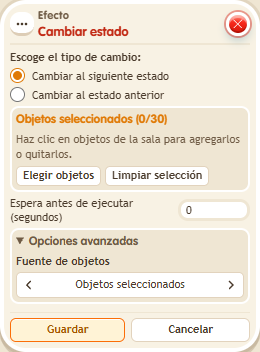
  Effect: Random state for that. In the window you choose the objects and set them to move to their next state.
Step by step
Start and pause a clock

- Place a new “Circuit clock”. Stack “Says something” and “Toggle state”.
- Set the word to “clock”. Select the clock in the effect and choose “Switch to next state”. Use delay 0 and save.
- Say “clock”, wait two seconds and say “clock” again.
- Check that the counter stops advancing; say the word again to resume it.
Result: The clock starts counting, pauses and then continues.
Settings
Notes
- This example follows the current clock behavior. Toggle state does not roll a die: use “Random state”.
- Effect: Change state doesn't roll a die. Use Effect: Random state for that.
- Only dice, roulettes and the Circuits clock have states.