






Condition: Object has another object on top
ConditionNo. 9153
Synopsis
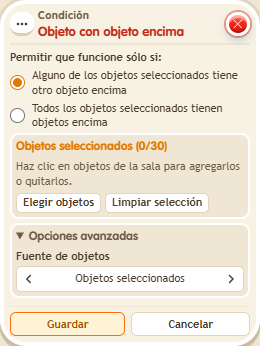
Select the object underneath, not the one placed on top. In BoomBang objects stack on BBoxes and circuits boxes. Useful to check that a piece sits on its base or that a platform is loaded.
Step by step
A BBox with another object on it
Boxes you need
 TriggerTrigger: Say something
- ConditionCondition: Object has another object on top
 EffectEffect: Show message
- Stack “Says something” 9111, this condition and “Show message” 9185. Set the trigger to “hello”, exact match; set the effect to “Matched”, targeting the triggering user.
- Place a BBox and select only that BBox in the condition. Leave the first matching option selected and save everything.
- Say “hello” with the BBox empty; place an object on it and repeat.
Result: The message appears after placing the object on top.
Settings
Notes
- Select the lower object, not the object you will place on top.