






Effect: Write to log on failure
EffectNo. 9229
Synopsis
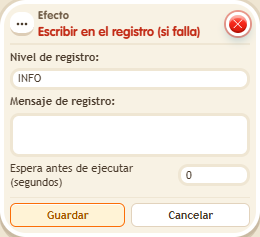
Same as  Effect: Write to log, but it only adds the entry when its stack's conditions are not met. Useful to find out why a stack is not doing what you expect without showing anything to players.
Step by step
Log a failed condition
Boxes you need
 TriggerTrigger: Say something
 ConditionCondition: User on object
- EffectEffect: Write to log on failure
- Stack “Says something” (“log”) and this effect, along with “User on object” selecting a walkable object A.
- Select INFO and enter “Off A”. Leave delay at 0 and save every box.
- Say “log” while not standing on A. Open /circuits → Log, refresh and find the text.
- Step on A, say “log” again and refresh: no new warning entry should be added.
Result: The log records only the branch where the condition fails.
Settings
Notes
- The log is read from the circuits menu and requires read permission; it is not a public chat message.