






Selector: Users with variable
SelectorNo. 9259
Synopsis
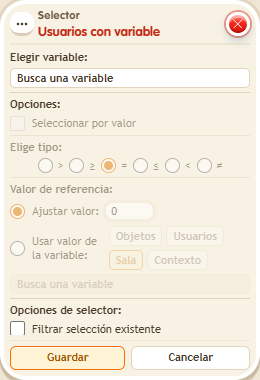
Choose the variable and, optionally, turn on “Select by value” with an operator and a value. The variable must exist before the firing: giving it in the same stack is too late for this selection. Use it to reward players above a score or holding a key.
Step by step
Select users with at least 5 points
Boxes you need
 TriggerTrigger: Say something
- SelectorSelector: Users with variable
 EffectEffect: Give variable
 EffectEffect: Show message

- Configure an “User variable” named “points”, with a value. Bring two people.
- In another stack, use “Says something” = “load” and “Give variable”: choose “points”, initial value 5, no overwrite, triggering user. Save and ask only one person to say “load”.
- Build the test stack with “Says something” = “select”, “Users with variable” and “Show message”. Choose “points”, enable “Select by value”, operator ≥ and fixed value 5.
- In “Show message”, enter “Selected”, use “Users from selector” and the message mode addressed only to the user. Save every box and say “select”.
Result: The person who loaded 5 points receives the message; the other does not.
Settings
Notes
- The variable must exist before the trigger that evaluates the selector. Giving it in that same stack happens too late for this selection.