






Condition: Object type does not match
ConditionNo. 9142
Synopsis
The opposite of  Condition: Object type matches, and it also compares specific objects even when they share a model. Use it to exclude one piece from a group watched by the same trigger, for example a trap mat among several normal ones.
Step by step
Exclude one specific rug
Boxes you need
 TriggerTrigger: Step on an object
- ConditionCondition: Object type does not match
 EffectEffect: Show message
- Place rugs A and B. Stack “Walks on object” 9117, this condition and “Show message” 9185, text “Matched”, to the triggering user. Select A and B in the trigger.
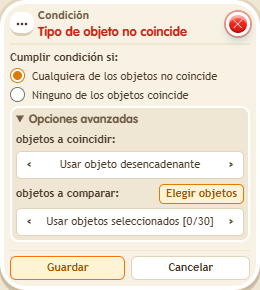
- In the condition, use the triggering object for objects to match. For objects to compare, use selected objects and select only A. Save everything.
- Step onto A, step off and step onto B.
Result: Only B shows “Matched”.
Settings
Notes
- It compares specific objects, even if both rugs are from the same catalogue entry.
- Condition: Object type matches compares specific objects: two identical dice are different objects.