






Addon: Random effects
AddonNo. 9264
Synopsis
On each activation it randomly picks the number of effects you set from the stack; the same one can repeat. The amount limits how many effects run, not how many people can trigger it. Great for surprises, varied prizes or different replies from the same sign.
Step by step
Choose a random message
Boxes you need
 TriggerTrigger: Say something
- AddonAddon: Random effects
 EffectEffect: Show message
- Stack “Says something” and three “Show message” boxes on one tile. Set the trigger text to “test”. Each message targets the triggering user, uses user-only mode and delay 0. Enter “One”, “Two” and “Three”, one per box.
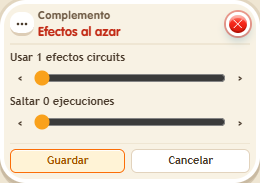
- Add “Random effects” to that tile. Set the effect count to 1 and save everything.
- Say “test” four times, leaving a second between messages.
Result: Each trigger displays one of the three messages. The same one may repeat.
Settings
Notes
- The quantity limits how many effects this extra chooses, not how many people may trigger the stack.