






Condition: Date matches
ConditionNo. 9174
Synopsis
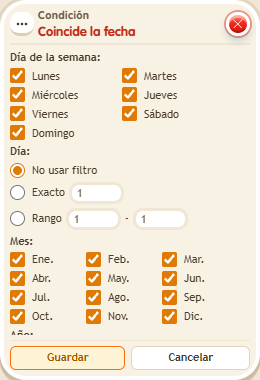
Choose the time zone and filter by weekdays, day of the month, month and year. Filters combine: all of them must match at once. Perfect for celebrations that repeat every year, like October 31, without fixing a year.
Step by step
Enable a celebration every October 31
Boxes you need
 TriggerTrigger: Say something
- ConditionCondition: Date matches
 EffectEffect: Show message
- Stack “Says something” 9111, this condition and “Show message” 9185. Set the trigger to “hello”, exact match; set the effect to “Matched”, targeting the triggering user.
- Choose “America/Bogota”, select all weekdays, exact day 31, October only, and no year filter. Save.
- Say “hello”: the message should appear only on October 31 according to Bogotá’s date.
- To rehearse today, change the day and month to the current ones in that zone and say “hello”. Then select a different month and repeat: it should no longer appear. Restore October 31 when finished.
Result: The check allows a celebration every October 31 without setting a specific year.
Settings
Notes
- The filters combine: deselecting the celebration’s weekday also prevents a match, even on October 31.