






Addon: Movement physics
AddonNo. 9284
Synopsis
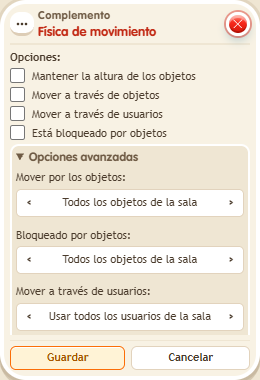
With options such as “Move through objects” or “Is blocked by objects” you decide whether a move can pass objects that normally block; each option has its own object or user source. If you enable both, blocking wins. Use it only in the movement stack that needs it, for example to pass through a secret wall.
Step by step
Allow a step through an object
Boxes you need
 TriggerTrigger: Say something
- AddonAddon: Movement physics
 EffectEffect: Move and rotate user
- Choose a row with an object that cannot be walked on. Stand one tile to its left. On another tile stack “Says something” = “step”, “Move and rotate user” and “Movement physics”.
- In the effect use the triggering user, movement right, no rotation and delay 0.
- In physics enable “Move through objects” and choose “All objects in the room” for that source. Leave “Blocked by objects” and the other options unchecked. Save and say “step”.
Result: Your keko reaches the tile occupied by the object that normally blocks movement.
Settings
Notes
- If you also enable “Blocked by objects”, blocking takes priority. Use this setting only in the movement stack that needs it.
- In Addon: Movement physics, “blocked by objects” wins over “passes through”.