






Effect: Move and rotate user
EffectNo. 9201
Synopsis
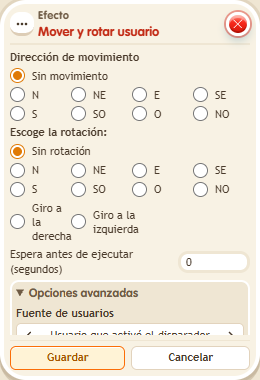
The keko takes one step in the chosen direction and can change where they face. The destination tile must allow the move: in BoomBang a keko never ends up on top of another one. Direction letters refer to the map. Useful for pushes, conveyor belts or tile games.
Step by step
Take one step east
Boxes you need
 TriggerTrigger: Say something
- EffectEffect: Move and rotate user
- Leave a clear tile east of your keko. Stack “Says something” and “Move and rotate user”.
- Set “step” in the trigger. In the effect choose direction E, no rotation and the triggering user.
- Save with delay 0 and say “step”. Repeat from another tile with room to move.
Result: The keko moves one tile east without applying an extra rotation.
Settings
Notes
- The destination must allow movement. Direction letters refer to the map.
- Kekos don't turn their head separately: head-only turns don't rotate anything.