






Effect: Show message
EffectNo. 9185
Synopsis
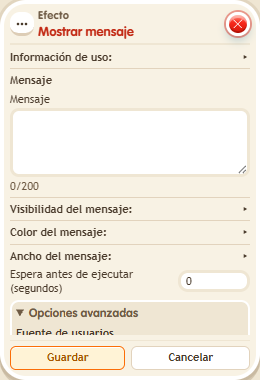
It sends a text of up to 200 characters. Under “Visibility” you decide whether only the chosen users see it (for example, whoever triggered it) or “Whole room”. If the trigger has no person (repeater, timer, signal), you need a user selector for the message to reach anyone. It is the simplest way to give notices, hints or welcomes.
Step by step
A private greeting
Boxes you need
 TriggerTrigger: Say something
- EffectEffect: Show message
- Stack “Says something” and “Show message”. Set the trigger to “hello”.
- Enter “Welcome to my island”. Set visibility to the selected users and the user source to the triggering user.
- Leave delay at 0, save both boxes and ask another keko to watch.
- Say “hello” and compare your view with the other keko's view.
Result: Only the keko who says the word receives the greeting.
Settings
Notes
- Messages support up to 200 characters. “Whole room” changes the example into a public announcement.
- Effect: Show message allows up to 200 characters.
Related
Used in these recipes