






Effect: Supercircuit
EffectNo. 9232
Synopsis
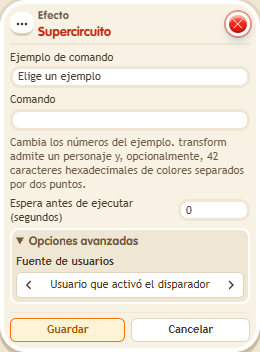
You type a command or pick one from the examples list. There are BoomBang commands such as transform:3 (turns the keko into character 3), transform:0 (restores their character), enablefreeze: and passpotion for potions, or roomdiagonal:false to block diagonal walking. Black skin is a paid feature: if neither the keko nor the owner has it, it shows as white. Some commands, such as sitting, dancing or held objects, have no visible effect in BoomBang.
Step by step
Change character and return
Boxes you need
 TriggerTrigger: Say something
- EffectEffect: Supercircuit
- Stack “Says something” (“change”) and “Supercircuit”.
- Under “Command example”, choose “Change character: transform:3”; check that the command field shows “transform:3”. Choose triggering user and delay 0.
- Save both boxes, say “change” and inspect your keko.
- Change the command to “transform:0”, save and repeat the word to restore your character.
Result: The first command changes to character 3 and the second restores your character.
Settings
Notes
- The command field belongs to this box. Use options with a BoomBang equivalent; sitting, dancing and hand-item functions do not provide that visible result.
 Effect: Mute user doesn't affect the owner, users with rights or moderators. Neither does the
 mutesupercircuit.- The supercircuit points commands (
addpoint…) only work on the “every game” scoreboards. - In Effect: Supercircuit,
transform:3turns the keko into character 3 with their own colours, andtransform:3:<42 hex colours>with those colours.transform:0brings back their character. - Black skin is a paid feature: if neither the keko nor the owner has it,
transformmakes it white. passpotionpasses the potion to the keko next to them (passpotion:<potion>only that one), who stays still for 1 second. Only potions given by a circuit are passed, never a bought one.enablefreeze:<potion>gives the potion and keeps the keko still for 1 second;enable:only gives the potion.- Mute, backwards or gibberish potions look the same as a bought one.
- With
roomdiagonal:falsenobody walks diagonally in the zone untilroomdiagonal:trueor the island reloads. - With
roompush:falseorroompull:falsenobody can use /push or /pull in the zone. Withtruethe island's own setting applies again: a circuit never enables them if the owner disabled them. - These supercircuits work but nothing is seen:
roomwalkthrough,roomlock,roomrespect,roomchangelook,roomtransform,roomhanditem,roomenable,roomsit,roomlay,roommimicandroommoonwalk. - Avatar effects are potions: when a box asks for an effect number, that number is the potion id.
- The
roommutesupercircuit mutes the zone on its own and never lifts a mute set by the owner.