






Effect: Change height
EffectNo. 9213
Synopsis
You can set a fixed value or raise and lower the current height. In BoomBang only BBoxes and circuit boxes have height: other decorative objects will not give the same result. Useful for rising and falling platforms or appearing stairs.
Step by step
Raise a BBox to level 3
Boxes you need
 TriggerTrigger: Say something
- EffectEffect: Change height
- Place a BBox on the ground. Stack “Says something” and “Change height”. Set “up”.
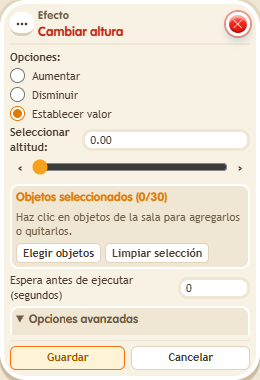
- Select the BBox in the effect. Choose “Set value” and enter 3.00 for height.
- Save with delay 0 and say “up”. Check the BBox's height.
Result: The BBox is placed at level 3.
Settings
Notes
- In BoomBang, BBoxes and circuit boxes have height; do not expect the same result on every decorative object.