






Trigger: Team reaches a score
TriggerNo. 9112
Synopsis
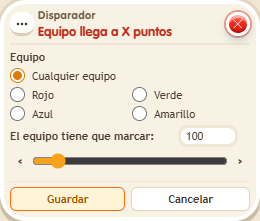
Pick a specific team or “Any team” and the score to reach. Team points only count while a game is running, that is, with the  Circuits clock started. Combine it with
  Effect: Give team points to end rounds or announce the winner.
Step by step
Announce twenty points
Boxes you need
- TriggerTrigger: Team reaches a score
 TriggerTrigger: Say something
 EffectEffect: Control clock
 EffectEffect: Join team
- EffectEffect: Give team points
 EffectEffect: Show message
- Place a timer 9302. Prepare three “Says something” 9111 stacks: “start” + “Control clock” 9231 set to Start, selecting that timer; “red” + “Join team” 9202, red team and Circuits game; “goal” + “Give team score” 9195 with 10 points, Give points, and the triggering user’s team. Use exact matching in all three triggers.
- Stack this box with “Show message” 9185, text “Twenty”, targeting the triggering user. Choose “Any team” and 20 points in the trigger. Save everything.
- Say “start”, “red” and “goal” twice, leaving a moment between words.
Result: The second goal shows “Twenty”; the first does not.
Settings
Notes
- Team points only count while a game is running.
- Team points only count while a game is running (the clock started). A new game resets them to 0.