






Effect: Unfreeze user
EffectNo. 9200
Synopsis
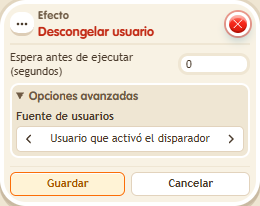
It is the partner of  Effect: Freeze user: the keko can walk normally again. Choose who to unfreeze with a user source, for example the triggering user. Use it with a keyword or when stepping on an object to release players.
Step by step
Restore a keko's movement
Boxes you need
 TriggerTrigger: Say something
- EffectEffect: Unfreeze user
- EffectEffect: Freeze user
- On one tile stack “Says something” (“freeze”) and “Freeze user”. Choose the “Specter” potion and leave “Unfreeze when teleporting” unchecked. Use the triggering user and delay 0.
- On another tile stack “Says something” (“free”) and “Unfreeze user”, also for the triggering user with delay 0. Save every box.
- Say “freeze” and try walking; then say “free” and walk again.
Result: “freeze” prevents walking; “free” removes the freeze and restores movement.
Settings
Notes
- Freezing is not muting: the participant can still say the release word. The chosen potion does not replace a purchased potion. “No potion” freezes without changing how the keko looks.