






Effect: Teleport to object
EffectNo. 9186
Synopsis
The keko appears on the destination object you pick. The trip can take up to half a second, and if two teleports reach the same keko in that time, the first one wins. With triggers that have no person you need a user selector to say who to move. Use it for portals, shortcuts or sending someone back to the start.
Step by step
From one rug to another
Boxes you need
 TriggerTrigger: Step on an object
- EffectEffect: Teleport to object
- Place two walkable objects, A and B, on different tiles.
- On another tile stack “Walks on an object” and this effect. Select only A in the trigger.
- In the effect select only B, the triggering user and delay 0. Save both boxes.
- Step onto A and wait up to half a second.
Result: Your keko appears on B.
Settings
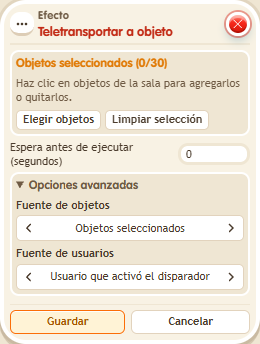
Notes
- A trigger without a person needs a user selector. Here, stepping on the object supplies the recipient.
- Effect: Teleport to object can take up to half a second, because it runs on the circuits clock.
- If the same keko receives two teleports within that half second, the first one wins.
- Joining a team or teleporting doesn't give the keko any visible effect.
- If the target object of Effect: Teleport to object has another keko on it, there is no teleport: one keko per tile.
Related
Used in these recipes