






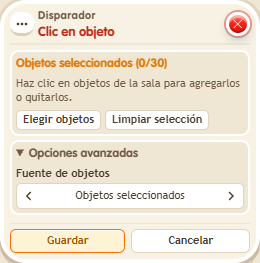
Trigger: Click an object
TriggerNo. 9124
Synopsis
Turns any object into a button: select the specific placed objects and the stack responds to a single click. Whoever clicks is the triggering keko. Use it for menus, teleports or switches.
Step by step
An object that acts as a button
Boxes you need
- TriggerTrigger: Click an object
 EffectEffect: Teleport to object
- Place an object to click and a destination rug. Select the first in this box and the rug in “Teleport to object” 9186, stacked with it. Save.
- Click the chosen object.
Result: You appear on the destination rug.
Settings
Notes
- Select the specific object instance in the room and save the selection.