






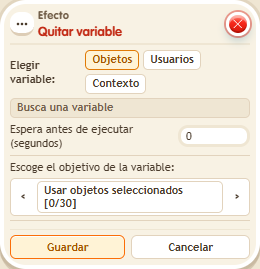
Effect: Remove variable
EffectNo. 9238
Synopsis
It removes the whole variable: it does not set it to zero. If you later need to change its value, you will have to give it again with  Effect: Give variable. Useful for taking away keys, quest marks or states when a game ends.
Step by step
Remove a user's variable
Boxes you need
 TriggerTrigger: Say something
- EffectEffect: Remove variable
- EffectEffect: Give variable

- Create the user variable “keys”, with a value and duration while in the room. Save.
- Prepare “Says something” (“give”) + “Give variable”: Users, “keys”, triggering user, initial value 7.
- In another stack prepare “Says something” (“remove”) + “Remove variable”: Users, “keys” and triggering user. Save both stacks with delay 0.
- Say “give” and check that /circuits Variables shows 7 for you. Say “remove”, refresh and look for your entry again.
Result: You no longer have “keys”; it does not leave an entry with value zero.
Settings
Notes
- To modify its value later, you must give it again. Removing a variable differs from setting it to 0.
- Effect: Remove variable deletes the whole variable; it doesn't set it to 0.
- Inside a stack the order is fixed: give → change → remove →
$(…)is read → messages → signal. It doesn't depend on height.