






Trigger: Clock reaches a time
TriggerNo. 9130
Synopsis
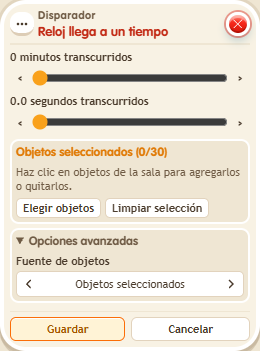
Select the  Circuits clock and set minutes and seconds. The clock counts up and the trigger fires exactly at that value. Do not confuse it with
  Trigger: Time reached, which uses the internal timer; for messages, add a user selector.
Step by step
Announce two seconds on the clock
Boxes you need
- TriggerTrigger: Clock reaches a time
 TriggerTrigger: Say something
 SelectorSelector: Users by name
 EffectEffect: Control clock
 EffectEffect: Show message
- Place a timer 9302. Build “Says something” 9111 = “start” with “Control clock” 9231, starting that timer.
- In another stack, select the timer in this box and set 0 minutes and 2 seconds. Add “Users by name” 9249 with your name and “Show message” 9185, text “Two seconds”, targeting “Users from selector”. Save.
- Say “start” and wait.
Result: The message appears when the timer reaches exactly 00:02.
Settings
Notes
- The timer counts upward. Do not confuse this object with the timer in box Trigger: Time reached.
- The Circuits clock counts up. Trigger: Clock reaches a time fires at that exact value.