






Condition: Variable value
ConditionNo. 9149
Synopsis
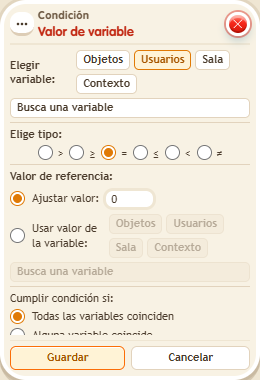
Choose the type, the variable, who is checked, the comparison (for example “greater than or equal to”) and the value. The variable must exist and be updated before the check. Use it to require points, levels or in-game coins before letting someone through.
Step by step
Require five points
Boxes you need
 TriggerTrigger: Say something
 TriggerTrigger: Step on an object
- ConditionCondition: Variable value
 EffectEffect: Show message
 EffectEffect: Give variable
 EffectEffect: Change variable value
- Stack “Says something” 9111, this condition and “Show message” 9185. Set the trigger to “hello”, exact match; set the effect to “Matched”, targeting the triggering user.
- Save a user variable
 9291 named “points”, with “Has a value” and “While the user is in the room”. In another stack, “Walks on object” 9117 selects a rug and “Give variable” 9237 gives “points” to the triggering user, initial 0, without overwriting.
 - Add “Change variable value” 9239 to the rug stack: Users, “points”, triggering user, Add 5 with a fixed value.
- In this condition choose Users, “points”, triggering user, greater than or equal to 5 and a fixed value. Save. Say “hello” before and after stepping onto the rug.
Result: Without points there is no message; at 5 points “Matched” appears.
Settings
Notes
- Giving and changing the variable happen before the later check in the “hello” stack.