






Condition: User type
ConditionNo. 9177
Synopsis
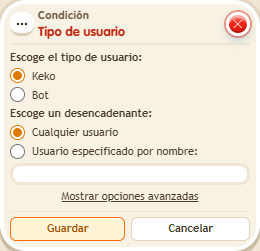
Choose the user type, such as “Keko”, and optionally a specific user by exact name. In the advanced options you decide who is compared, for example the triggering user. Useful to reserve something for one player or tell user types apart.
Step by step
Recognize a user by name
Boxes you need
 TriggerTrigger: Say something
- ConditionCondition: User type
 EffectEffect: Show message
- Stack “Says something” 9111, this condition and “Show message” 9185. Set the trigger to “hello”, exact match; set the effect to “Matched”, targeting the triggering user.
- Choose the player type and “User specified by name”; enter your exact username.
- In advanced settings, compare the triggering user with the user specified by name. Save.
- Say “hello” with your account and have another person with a different name say the same thing.
Result: The message appears for your account and not the other one.
Settings
Notes
- This check compares usernames. Do not use the room name or an object name.