






Effect: Change object color
EffectNo. 9315
Synopsis
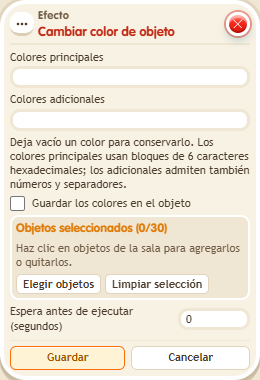
Enter the main colour and, if you like, the extra ones; any left empty stays as it is. With “Save colours on the object” the change is kept; without it, it lasts until the server restarts. A wrongly written colour is not saved. Great for lights, traffic lights or scenery that changes with the game.
Step by step
Paint an object green
Boxes you need
 TriggerTrigger: Say something
- EffectEffect: Change object color
- Place an object that supports recoloring. Stack “Says something” (“paint”) and “Change object color”.
- Select only that object. Enter “00FF00” in main colors and leave additional colors empty.
- Uncheck “Save the colors on the object” for this first test. Save with delay 0.
- Say “paint” and observe the main color.
Result: The main color changes to green while additional colors are preserved.
Settings
Notes
- Without saving, the color lasts until the server restarts. Enable saving when you want to keep it; invalid colors are not saved.
- Effect: Change object color uses BoomBang colours “color1|color2”. One can be left empty, and that one isn't changed.
- With “save” the colour is kept for good; without “save”, it lasts until the server restarts.
- Badly written colours aren't saved.
Related
Used in these recipes