






Condition: Team score
ConditionNo. 9166
Synopsis
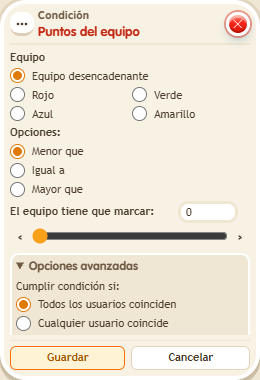
Choose the team, the comparison and the value. It reads that team’s score even if the triggering keko is on another team. Team points only count while a game is running on the  Circuits clock. Use it to award the win or unlock prizes at a certain score.
Step by step
Require more than five red points
Boxes you need
 TriggerTrigger: Say something
- ConditionCondition: Team score
 EffectEffect: Show message
 EffectEffect: Control clock
 EffectEffect: Give team points
- Stack “Says something” 9111, this condition and “Show message” 9185. Set the trigger to “hello”, exact match; set the effect to “Matched”, targeting the triggering user.
- Set the condition to red team, “greater than”, value 5.
- Place a “Game clock” 9302. Create a stack with “Says something” 9111, exact text “start”, and “Control clock” 9231, Start action, selecting that clock.
- Create another stack with “Says something” 9111, exact text “goal”, and “Give team points” 9195: add 6 points to red. Save.
- Say “start” and “hello”. Then say “goal” and repeat “hello”.
Result: The message does not appear with no points; it does once red has 6.
Settings
Notes
- The condition reads the selected team’s score even if the speaker belongs to another team.
- Team points only count while a game is running (the clock started). A new game resets them to 0.
- In team conditions, a fixed colour is a fact about the zone: it doesn't look at anyone.
- With “triggering user's team”, if the keko has no team the condition is not met.