






Effect: Move object to user
EffectNo. 9190
Synopsis
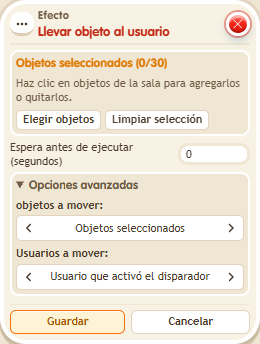
The selected object moves straight to the target keko's tile. In the window you choose the object and which user to go to (for example, the triggering user). Use it to bring a piece to a player, mark their position or have an object follow them.
Step by step
Bring an object to your tile
Boxes you need
 TriggerTrigger: Say something
- EffectEffect: Move object to user
- Place a movable object away from a clear tile where you can stand.
- Stack “Says something” and “Bring object to user”. Set “come”.
- Select that object and the triggering user in the effect. Use delay 0 and save.
- Stand on the chosen tile and say “come”.
Result: The object moves to the tile of the keko who spoke.
Settings
Notes
- Use a small object and keep the surrounding area clear to distinguish this move from a relative offset.