






Context variable
VariableNo. 9293
Synopsis
It is born and dies with each run: use it for in-between calculations without leaving stored values. It works with  Effect: Give variable,
  Effect: Change variable value,
  Addon: Capture chat text or
  Addon: Count object types in chest, and is shown with
  Addon: Variable value in text in Context scope. To keep data afterwards, use a user, object or room variable.
Step by step
Calculate 7 times 3 without storing a value
Boxes you need


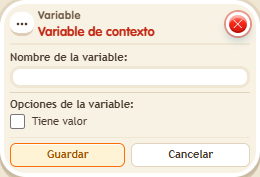
- Configure the Context variable with the name “tmp” and enable “Has value”. Save.
- On another tile, stack “Says something” = “calculate”, “Give variable”, “Change variable value”, “Variable text” and “Show message”.
- In “Give variable”, choose Context, tmp and a fixed initial value of 7. In “Change value”, choose tmp from Context and multiply it by a fixed value of 3.
- In “Variable text”, choose tmp from Context, numeric output and the name “tmp”. Set the message for the triggering user to “Result: $(tmp)”. Save every box.
- Say “calculate” twice, leaving a second between executions.
Result: Both executions show “Result: 21”. The second execution starts with a new context.
Settings
Notes
- This variable only lives during an execution. Use a user, object or room variable to retain data afterwards.
- The Context variable is born and dies in each execution.