






Condition: Variable age
ConditionNo. 9150
Synopsis
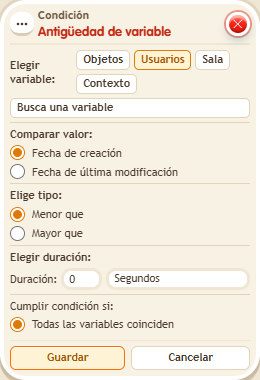
Choose the variable, whether to count from its “Creation date” or its last modification, the comparison (“less than” or “greater than”), the duration and the unit. Use it for cooldowns between uses, timed rewards or turns.
Step by step
Wait two seconds after receiving a variable
Boxes you need
 TriggerTrigger: Say something
 TriggerTrigger: Step on an object
- ConditionCondition: Variable age
 EffectEffect: Show message
 EffectEffect: Give variable
- Stack “Says something” 9111, this condition and “Show message” 9185. Set the trigger to “hello”, exact match; set the effect to “Matched”, targeting the triggering user.
- Save a user variable
 9291 named “turn”, with “Has a value” and “While the user is in the room”. In another stack, “Walks on object” 9117 selects a rug and “Give variable” 9237 gives “turn” to the triggering user, initial 0, without overwriting.
 - In the condition choose Users, “turn”, triggering user, “Creation date”, “Greater than”, duration 2 and Seconds. Save everything.
- Step onto the rug and say “hello” immediately; wait more than 2 seconds and repeat.
Result: The message appears only after the wait has elapsed.
Settings
Notes
- Choosing “last modified” would measure time since the last value change.
- Condition: Variable age only has “less than” and “greater than”, counting from when the variable was created or last changed.