






Effect: Offset object position
EffectNo. 9236
Synopsis
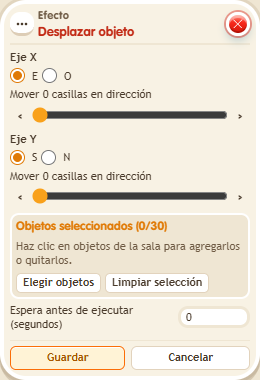
You set a horizontal direction and amount and a vertical one, and the object moves that distance from where it is. It is a relative move: repeating it adds the distances again from the new position. Useful for objects that jump forward or sliding puzzles.
Step by step
Offset an object by two tiles and one
Boxes you need
 TriggerTrigger: Say something
- EffectEffect: Offset object position
- Leave a clear rectangle three tiles wide and two tiles high; place a movable object at its starting corner.
- Stack “Says something” (“move”) and “Relative object move”. Select that object.
- For horizontal movement choose E and amount 2. For vertical movement choose S and amount 1. Save with delay 0.
- Say “move” and compare the final tile with the starting tile.
Result: The object ends two tiles east and one tile south of its starting point.
Settings
Notes
- This is a relative offset: repeating it applies the same distances from the new position.